
Starting a website can feel overwhelming when you are new to WordPress. Many beginners assume they need coding skills, database setup knowledge, or technical experience before they can launch a site. The good news is that a 1 click WordPress install removes most of that complexity and makes the setup process much easier.
For first-time website owners, a 1 click WordPress install is one of the fastest ways to go from buying hosting to publishing a live website. Instead of uploading files manually and creating databases yourself, you can install WordPress directly from your hosting control panel in just a few steps. That is why this method is so popular among bloggers, business owners, freelancers, and anyone who wants a simple start.
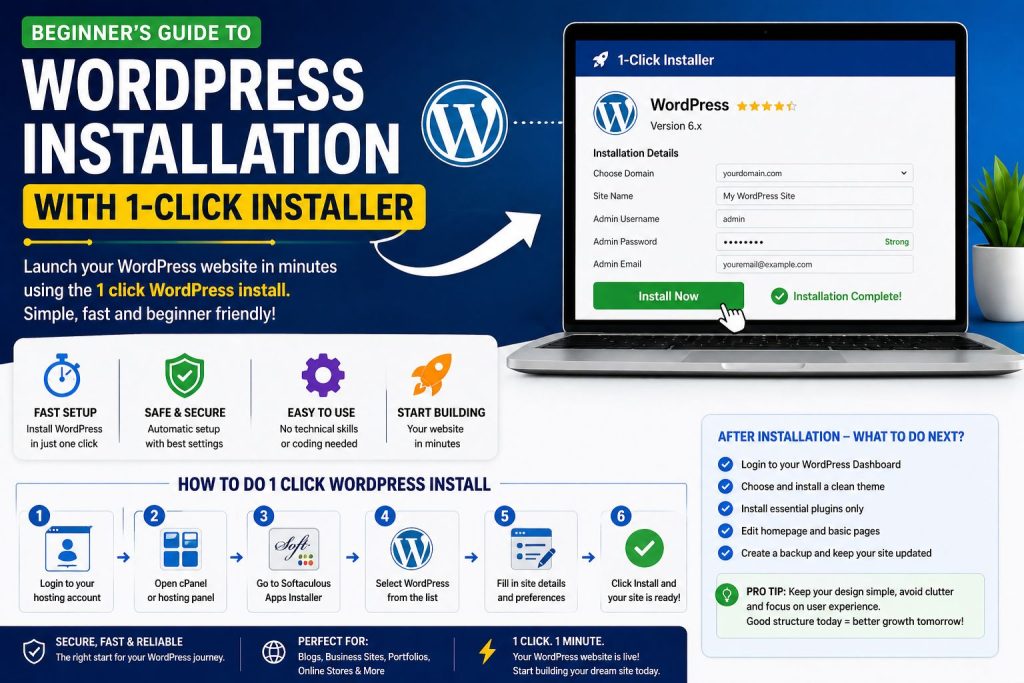
Why a 1 click WordPress install is perfect for beginners
A 1 click WordPress install is ideal for beginners because it saves time and reduces mistakes. Manual installation often requires database creation, file uploads, configuration edits, and technical checks. If you are completely new, that process can feel confusing very quickly. A one-click solution simplifies everything by handling the setup automatically inside your hosting dashboard.
This method also helps you avoid some of the common problems that slow new website owners down. Many beginners rush through setup, skip important details, or choose the wrong settings because they want the site live as soon as possible. That can lead to security issues, poor site structure, and login confusion later. A guided installer makes the process smoother and safer from the start.
There is another major benefit too. A 1 click WordPress install allows you to focus on building the website instead of getting stuck in technical setup. Once the system is installed properly, you can move on to themes, pages, plugins, menus, and branding without wasting hours on server-level tasks. For most beginners, that is the smarter path.
What you need before starting your 1 click WordPress install
Before you begin your 1 click WordPress install, make sure you have a few basics ready. First, you need a domain name. This is your website address, such as yourbrand.com. Second, you need hosting that supports WordPress and includes a control panel like cPanel or a similar dashboard. Most modern hosting providers offer a built-in installer through tools such as Softaculous or a hosting application manager.
You should also think about your website name, admin email, username, and password before starting. These details may look small, but they matter. Your website title is often the first identity your site shows after installation. Your admin login should be secure and easy for you to remember. A strong password protects your site from unnecessary risks right from the beginning.
This is also a good time to think ahead. Many new website owners ask, what are common web design mistakes to avoid, but they often forget that strong setup comes before design. If the installation is rushed or the basic settings are poor, even a beautiful website can become harder to manage. Good structure from the beginning helps you avoid future frustration.
Step by step: how to complete a 1 click WordPress install
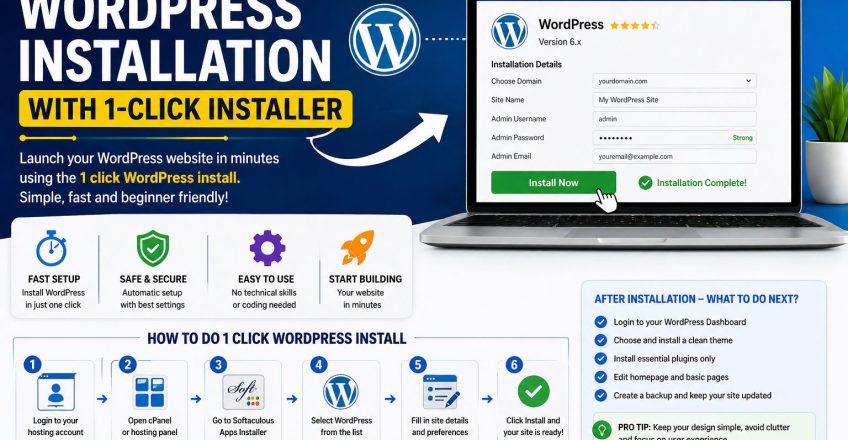
The actual 1 click WordPress install process is much easier than most people expect. After logging into your hosting account, open your control panel and look for the WordPress installer. In many cases, it appears under Softaculous, applications, or website tools. Once you open it, click the WordPress option and start the installation wizard.
The system will usually ask where you want to install WordPress. You can choose your main domain or a subdomain if you are testing a project first. Most beginners should install it on the main domain. Then you will add the website name, short description, admin username, password, and admin email. Some hosts may also offer settings for language, plugins, themes, or automatic updates at this stage.
After you fill in the details, click install and wait a few moments. That is the point where the 1 click WordPress install does its job. The platform creates the database, configures the files, and prepares your website automatically. Once the process finishes, you will receive a login link to your WordPress dashboard. From there, you can start building pages, changing design settings, and customizing the site for your needs.
The biggest advantage here is simplicity. Instead of dealing with technical file structures, you get a working website in minutes. That is why beginners prefer this method over manual installation.
What to do right after WordPress is installed
A successful 1 click WordPress install is only the beginning. After installation, you should take a few smart steps to make your website more secure, useful, and ready for growth. Start by logging into the WordPress dashboard and checking the general settings. Make sure your website title, timezone, language, and permalink structure are correct.
Next, remove anything you do not need. Many fresh installations include sample posts, demo pages, and default plugins. Clean those out so your website starts with a tidy structure. Then choose a lightweight theme that matches your goals without making the website heavy or confusing.
This is also the right time to install only the essential plugins. Beginners often make the mistake of installing too many tools too early. That can slow the site down and create plugin conflicts. In some cases, poor plugin choices can even contribute to a wordpress website white screen, which is a blank screen issue that often appears after a theme or plugin error. Keeping your setup clean reduces that risk.
You should also think about internal links and structure as your website grows. If pages move later, broken links can appear. A link fixer approach, whether manual or plugin-based, can help keep your website healthy and easy to navigate over time.
Mistakes beginners should avoid after installation
Even after a smooth install, new users often make avoidable mistakes. One of the biggest is ignoring updates. WordPress core files, themes, and plugins should stay updated for security and performance. Another mistake is choosing a theme only because it looks flashy. Some of the top website design mistakes happen when site owners focus too much on visual effects and not enough on speed, readability, and mobile experience.
This is where web design mistakes begin to affect the whole website. Heavy themes, cluttered layouts, too many fonts, and oversized banners may look impressive at first, but they can hurt speed and usability. After a 1 click WordPress install, your goal should not be to add everything at once. Your goal should be to build a clean, easy-to-use site that visitors understand immediately.
Another common mistake is skipping backups and security settings. Just because the installation was simple does not mean the website can protect itself. Set up backups, use strong login credentials, enable SSL, and install a trusted security plugin if needed. A smooth install gives you a strong start, but smart maintenance keeps the site healthy.
Why one-click installation is still the best option for most new users
For most beginners, a 1 click WordPress install is still the best balance of speed, convenience, and reliability. It helps you launch without technical stress and reduces the chance of setup errors that often happen during manual installation. It also allows you to spend more time on what actually matters, such as content, layout, branding, and user experience.
That does not mean you should ignore the rest of the website after installation. Good hosting, thoughtful design, clean navigation, and simple structure still matter. But once WordPress is live, the hardest part is already behind you. A 1 click WordPress install gives you a working foundation so you can focus on building something useful and professional.
Final thoughts
If you are new to WordPress, there is no need to make the process harder than it needs to be. A 1 click WordPress install gives you an easy and beginner-friendly way to launch your website without technical confusion. It saves time, reduces setup mistakes, and helps you start with confidence.
Once your site is installed, take the next steps carefully. Keep the design clean, avoid unnecessary plugins, stay updated, and build pages with the visitor in mind. When you combine a strong setup with smart decisions after launch, your WordPress website becomes much easier to manage and much more likely to succeed.
Our Trusted User :
Share this Post

Best Hosting for Startups in Pakistan
EcomiHost Blog10 Features Every Business Hosting Plan Should Have
EcomiHost Blog