


Running a WordPress website feels simple in the beginning. You install a theme, add a few plugins, publish pages, and expect everything to work smoothly. But many site owners soon discover that small mistakes can create big problems. Slow speed, broken layouts, login issues, poor SEO, and security risks often start with a few overlooked details. That is why understanding basic WordPress errors is so important for beginners and business owners alike.
The good news is that most of these problems are fixable. You do not need to be a developer to improve your site. You simply need to know what usually goes wrong and how to handle it correctly. When you fix the most common basic WordPress errors, your website becomes faster, safer, easier to manage, and more professional for visitors.
Why Small WordPress Mistakes Create Bigger Problems
Many website owners ignore small issues because the site still looks fine on the surface. A plugin warning may seem harmless. A slow-loading page may not feel urgent. A missing update may look like something you can handle later. But this is exactly how basic WordPress errors begin to hurt performance, rankings, and user trust.
WordPress is powerful because it is flexible, but that flexibility also means every part of the site needs attention. Themes, plugins, hosting, updates, images, and security settings all work together. If one area is weak, the rest of the website can suffer. A strong WordPress website depends on a healthy foundation, not just a good design.
Using Too Many Plugins Without a Clear Purpose
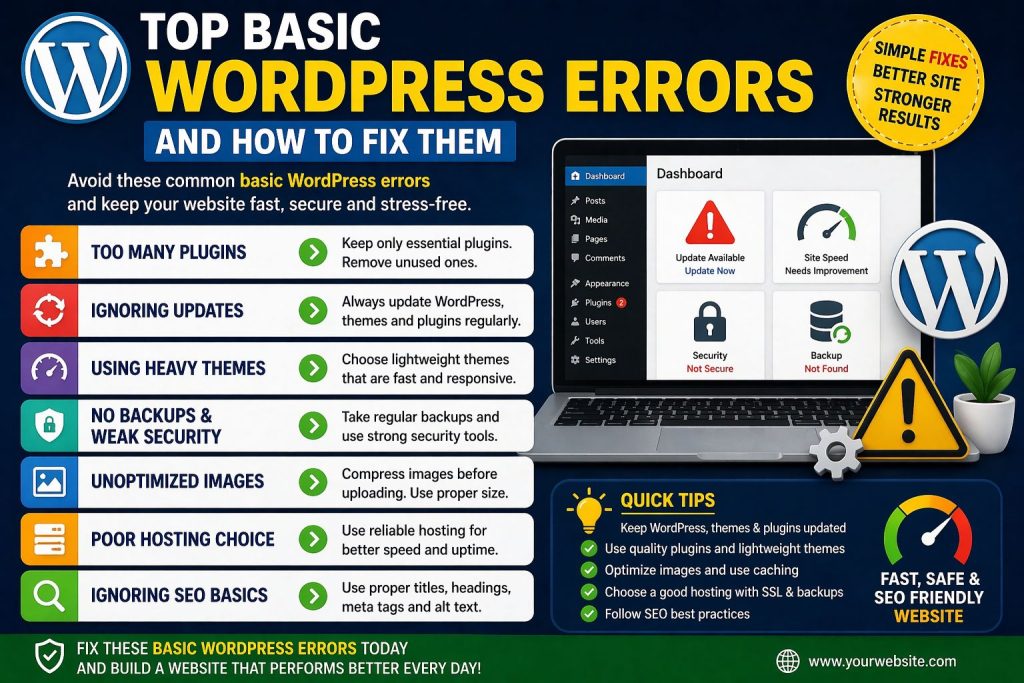
One of the most common mistakes in WordPress is installing too many plugins. Beginners often add a new plugin for every small feature. They want sliders, forms, backups, popups, security tools, speed tools, design tools, and social sharing tools all at once. The problem is that too many plugins can slow the website, create conflicts, and increase security risks.
This is one of the most avoidable basic WordPress errors because the fix is simple. Only keep plugins that you truly need. Remove anything inactive or unnecessary. Choose reliable plugins with good reviews, regular updates, and clear support. One strong plugin is often better than three weak ones trying to do similar jobs. A clean plugin setup gives your website better performance and fewer technical headaches.
Ignoring Updates for Themes, Plugins, and Core Files
Many people delay updates because they are afraid something might break. That fear is understandable, but ignoring updates creates even bigger risks. Outdated plugins and themes can open the door to bugs, compatibility issues, and security vulnerabilities. In some cases, a single outdated plugin is enough to damage the entire website.
Among the most damaging basic WordPress errors is treating updates like an optional task. Updates exist for a reason. They improve security, fix known issues, and keep your website compatible with the latest WordPress version. The safer approach is to take a backup first and then apply updates carefully. That way, you protect your site while keeping everything current. A regularly updated WordPress site is usually more secure, more stable, and easier to manage over time.basic WordPress errors
Choosing a Heavy Theme That Looks Good but Performs Badly
A beautiful theme can attract attention, but a heavy theme can also create problems. Many beginners choose a theme based only on appearance. They pick something full of animations, oversized sliders, and built-in effects without checking how it affects speed and usability. A site may look impressive at first, yet load slowly and frustrate visitors on mobile devices.
This is one of those basic WordPress errors that hurts both user experience and SEO. A better choice is a lightweight, responsive, well-coded theme that supports your business goals without adding unnecessary weight. Good design is not only about style. It is also about speed, clarity, and usability. A website that loads fast and feels clean usually performs better than one that tries to do too much.
Forgetting About Backups and Security Until It Is Too Late
Many WordPress users only think about backups after something goes wrong. A hacked website, plugin conflict, accidental deletion, or failed update can happen at any time. Without a recent backup, recovery becomes stressful and time-consuming. The same is true for security. Many site owners assume small websites are safe, but every website can become a target.
These are some of the most dangerous basic WordPress errors because they affect your website’s survival, not just its appearance. Every WordPress website should have regular backups, a secure login setup, strong passwords, SSL protection, and a trusted security plugin or firewall layer. It is always easier to prevent damage than to repair it later. A secure website protects your data, your visitors, and your brand reputation.basic WordPress errors
Uploading Unoptimized Images and Slowing the Entire Website
Images make a website look better, but oversized images can quietly destroy performance. Beginners often upload large files directly from a phone or design tool without compressing them first. That causes pages to load slowly, especially on mobile devices. Visitors may leave before the content fully appears, and search engines may view the page as a poor experience.
This is one of the most common basic WordPress errors because it happens so easily. The fix is practical. Resize images before uploading them, compress them properly, and use modern formats when possible. You should also avoid adding too many large images on a single page unless they are necessary. Fast pages feel better, rank better, and convert better. Image optimization is a small task with a big payoff.basic WordPress errors
Using Weak Hosting and Blaming WordPress for Everything
Sometimes the website is not the real problem. The hosting environment is. Many users install WordPress on weak hosting plans and then assume WordPress itself is slow. In reality, poor hosting can cause slow load times, downtime, security weaknesses, and admin panel lag. Even a well-built WordPress site can struggle if the hosting foundation is weak.
This is one of the most misunderstood basic WordPress errors because beginners often focus only on themes and plugins. Good hosting supports speed, security, backups, uptime, and reliable performance. If your site feels slow even after optimization, your hosting plan may be the reason. A better server environment can improve your website more than many small design changes ever will.
Ignoring SEO Basics While Focusing Only on Design
A WordPress website should not only look good. It should also be easy to find. Many website owners spend hours on colors, sections, and layouts but forget SEO basics such as proper headings, meta titles, alt text, internal links, and clean URLs. As a result, the site may look polished but struggle to attract organic traffic.
This is another example of basic WordPress errors that hold websites back from growth. Strong SEO starts with simple habits. Use clear headings, write useful content, optimize page titles, and make sure your site structure is easy for both users and search engines to understand. WordPress gives you strong SEO potential, but you still have to use it wisely.basic WordPress errors
Final Thoughts
Most WordPress problems do not come from one major disaster. They come from small habits repeated over time. Too many plugins, missed updates, heavy themes, weak hosting, poor image handling, and ignored security can slowly turn a good website into a frustrating one. Once you understand these basic WordPress errors, you can fix them before they cause long-term damage.
The best part is that improvement does not require perfection. It requires awareness and smart action. Review your website, remove what is unnecessary, strengthen what matters, and keep your setup clean. When you avoid basic WordPress errors, your site becomes faster, safer, easier to rank, and far more useful for the people who visit it.basic WordPress errors
Our Trusted user:
Share this Post

Common Basic Hosting Errors Beginners Should Avoid
EcomiHost BlogBasic Website Setup Errors That Slow Down Your Site
EcomiHost Blog